
moon-gorgeous-gamepad-remapper
moon-gorgeous-gamepad-remapper is a lightweight Linux CLI tool that intercepts input events from a physical gamepad and remaps them through user-defined Lua scripts before forwarding them to a virtual controller. This can fix issues like swapped buttons or inverted axes when using controllers your games do not support well.
Many PC games today expect a Microsoft-style controller and do not work well with older devices you may still have lying around. Some do not even let you remap keys. There are already programs that fill the gap, like Input Remapper and MoltenGamepad. I wanted something CLI-only that would allow event transformations to be defined entirely as a script file in some imperative language, not some custom format.
Lua fits this role perfectly and gives you full control over event processing by letting you manipulate raw evdev events. No need to change the utility itself when a script changes: they are interpreted on the fly at load time.
Basic knowledge of Linux evdev event representation is needed: you can read
more at the Linux kernel documentation.
It also has a mascot, Tsukiko-chan, whom you can see in the image above. She resembles a certain moon-related fighter for justice who performs a special move named similarly to this tool. I found it appropriate for a tool that revolves around Lua scripting (Lua meaning Moon in Portuguese) written by an avid anime consumer.
Overview
The tool sits between your physical controller and the games:
Physical gamepad ──▶ moon-gorgeous-gamepad-remapper
  ──▶ Virtual gamepad ──▶ Games
It reads raw evdev events via libevdev, passes them through a Lua transformation script, and writes the remapped events to a virtual device created via uinput.
Quick start
moon-gorgeous-gamepad-remapper \
  --source "name:My Controller" \
  --virtual "My Virtual Controller" \
  --transformation builtin:sixaxis
This grabs the physical controller named “My Controller”, creates a virtual
XBox-compatible controller, and applies the built-in sixaxis profile to remap
it. Controller names can be viewed using the evtest tool.
Command-line options
--source <name>— Name of the source controller (required). Usename:prefix to match by evdev name, ordev:prefix to open a device node directly (e.g.dev:/dev/input/event5).--virtual <name>— Name of the virtual controller to create (required). It has no purpose other than appearing inevtestoutput.--transformation <path>— Path to a Lua 5.3 transformation script, orbuiltin:<name>to use a built-in profile (required).--block-source— Rename the source event node to hide it from other processes. Restored on exit.--verbose— Enable logging events received and sent. Useful if “nothing happens” to see if events are really being processed.--help— Print usage and exit.
Built-in profiles
The following profiles ship with the tool and can be referenced as
builtin:<name>:
sixaxis— Maps a Sony SixAxis (PS3) controller connected via Bluetooth to standard XBox layout. Converts digital D-Pad to analog hat, swaps SQUARE/TRIANGLE to match X/Y, drops digital trigger events, and scales analog axes.dualshock— Maps a Sony DualShock (PS1/2) controller to standard XBox layout. Remaps face buttons and converts digital L2/R2 to analog triggers. Since you cannot directly connect a PSX-era controller to a PC, this profile works with the following adapter, reported as0e8f:0003 GreenAsia Inc. MaxFire Blaze2.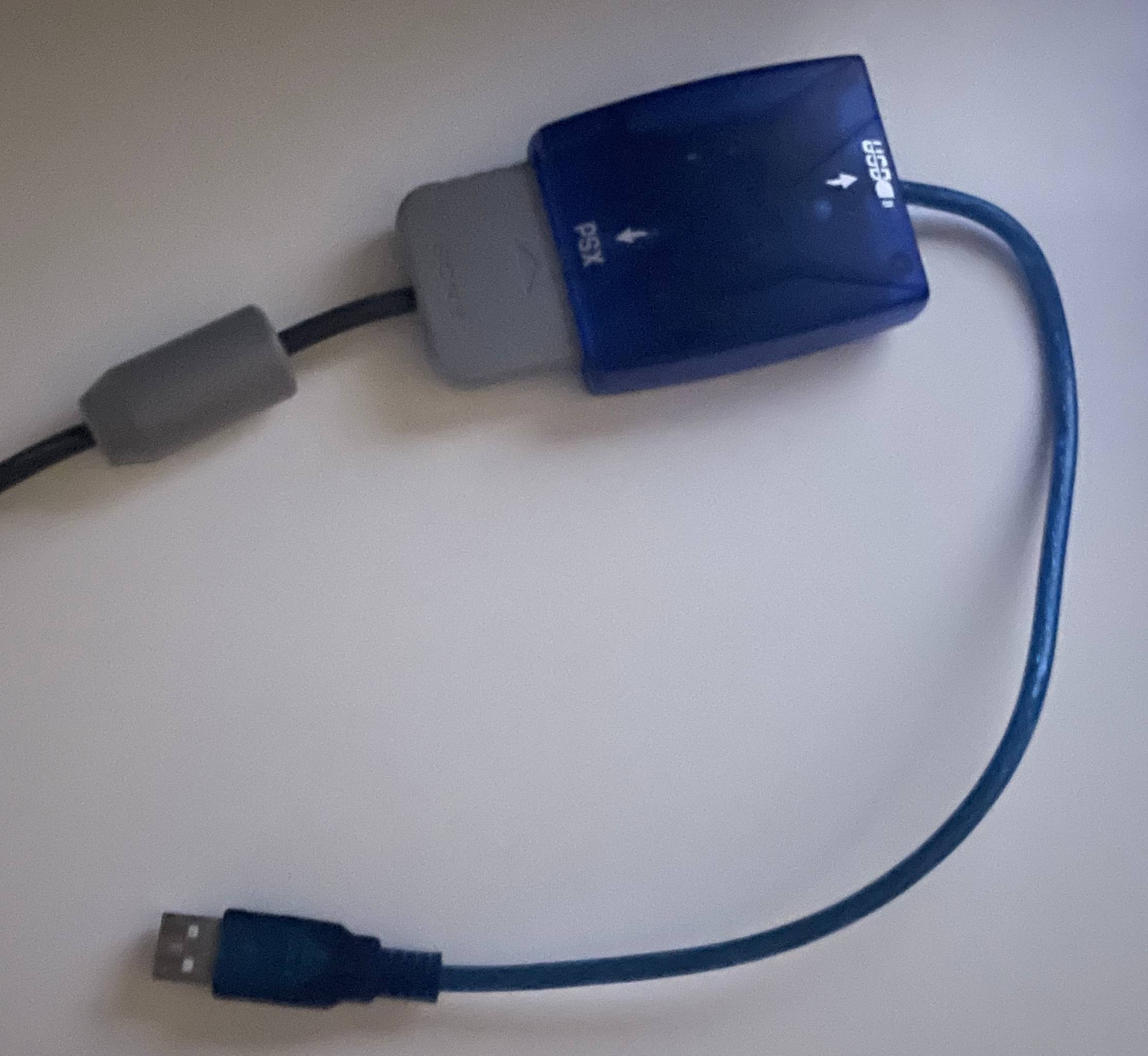
noisy_triggers— Fixes controllers with noisy analog triggers by quantizing the lower and upper halves of the axis range to the extremes (0 or 255).
Security model
Privilege requirements
moon-gorgeous-gamepad-remapper needs elevated privileges for three operations:
-
Opening
/dev/inputdevice nodes — reading from a physical controller requires read access to/dev/input/event*. The source device is grabbed exclusively withlibevdev_grab(), which also requires write access. -
Creating virtual devices via
/dev/uinput— the virtual gamepad is created through the uinput kernel interface, which requires write access to/dev/uinput. -
Hiding source device nodes — some games will stop on the first controller they find and the virtual controller is likely numbered higher than the source one. The option
--block-sourcerenames the source by hiding it (/dev/input/.eventX) hoping that games will skip over it. Many do. The original name is restored on exit, unless the program crashes.
How privileges are managed
We try to be flexible in how we manage elevated privileges, by following this procedure when dropping privileges:
- if the real UID (GID) differs from the effective UID (GID), the effective one is set to the real one;
- then, if the real UID not
root, we drop all capabilities.
This allows for several ways to run the program:
- if you start it as
root(viasystemdorsudo) no changes are done to IDs and capabilities. The program effectively runs with high privileges all the time. - If you set it
suid root, the real and effective UIDs will be different and so we’ll switch to the real one when we drop. Capabilities are also dropped. Most of the time, the program runs unprivileged. - If you give it capabilities via
setcap, it works much like the previous case. However, it will only be able to do what the specific capabilities allow, rather than having full root power. This is my preferred solution. The program only really needsCAP_DAC_OVERRIDE. - You run it as a normal user and configure
udevrules to grant access to/dev/input,/dev/input/eventXand other device nodes to your user. While this seems more secure, it also means that any program running as your user will be able to access those files.
The Arch Linux MAKEPKG provided with the sources installs the program with
CAP_DAC_OVERRIDE enabled.
Lua script execution
Lua scripts run after privilege drop. They cannot access device nodes or
perform privileged operations. The standard Lua libraries (math, string, table,
etc.) are available, plus the mggr.common module provided by the tool.
Lua profiles
See the Lua profiles guide for details on how to write custom transformation scripts.
Latency
Tests on my system report an average of 67 microseconds required to fully process a frame, measured from the time the input frame is complete to the moment the last event of the transformed frame is sent out.
Building
Dependencies
- C23-capable compiler (GCC or Clang)
- CMake ≥ 3.10
- libevdev ≥ 1.11.0
- Lua 5.3
- libcap
- pkgconf
Please remember that Lua releases differing by minor number (5.3 vs 5.4) are not compatible. You should really build against Lua 5.3.
Build
cmake -B build -DCMAKE_BUILD_TYPE=Release -DCMAKE_INSTALL_PREFIX=/usr/local .
cmake --build build
Install
cmake --install build
# Optional but recommended
# setcap cap_dac_override=ep /usr/local/bin/moon-gorgeous-gamepad-remapper
Packaging
An Arch Linux AUR PKGBUILD is provided under packaging/aur/.
License
MIT